
The Intelligent Security Graph — Unexpected consequences (Part 2)
In Part 1 of this series, we explored a fundamental question: just because an application is reputable, does that mean it belongs in your organization? We introduced the Intelligent Security Graph (ISG) and examined whether enabling it is the right call for your environment.
In this second and final part, we shift focus to a technical challenge that the ISG introduces — one that is documented by Microsoft, but easy to misread and even easier to underestimate.
A Warning Worth Reading Twice
Microsoft's documentation on Authorizing reputable apps with the ISG contains two important warnings. The first is relatively straightforward:
Since the ISG is a heuristic-based mechanism, it doesn't provide the same security guarantees as explicit allow or deny rules. It's best suited where users operate with standard user rights and where a security monitoring solution like Microsoft Defender for Endpoint is used.
The second warning is where things get interesting — and where most people's eyes glaze over:
Since the ISG option passes along reputation from app installers to the binaries they write to disk, it can over-authorize files in some cases. For example, if the installer launches the app upon completion, any files the app writes during that first run will also be allowed.
In training sessions, we've seen time and again that people read this, nod along, and move on without fully registering what it means in practice. This post is about making that impact concrete.
How the ISG Works Under the Hood
The ISG shares its underlying mechanism with the Managed Installer feature. Both rely on NTFS Extended Attributes (EAs) — specifically the Smartlocker.OriginClaim EA — to mark files as trusted.
Smartlocker, incidentally, is Microsoft's internal codename for both Managed Installer and the Intelligent Security Graph.
You can inspect these attributes on any Windows system with:
FsUtil File QueryEA <filename>
One key distinction between the ISG and Managed Installer: with the ISG, extended attributes are not set when a file is written to disk. They are set when the file is first launched and the ISG cloud service is contacted. At that point, the cloud service returns a trust verdict, and the extended attributes are written accordingly.
That detail matters more than it might seem at first glance.
Setting the Stage — Testing Application Control
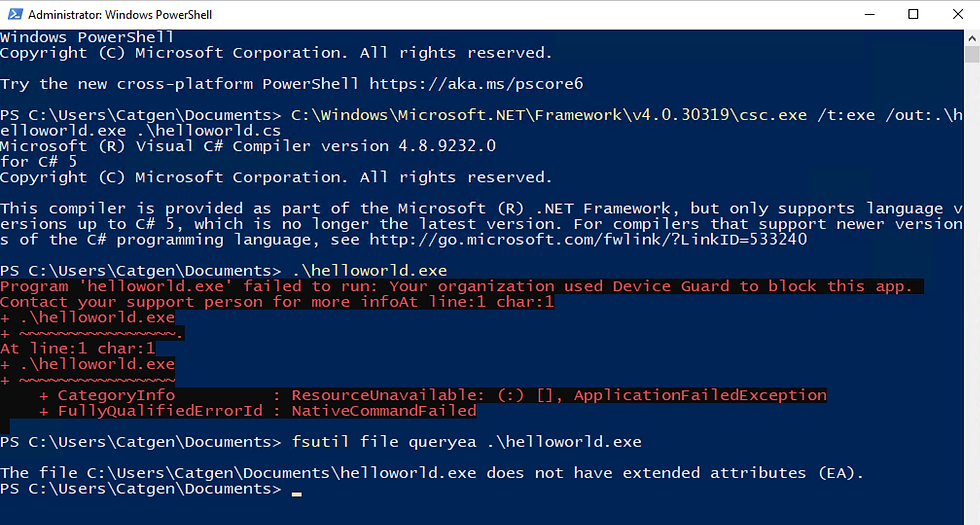
Before pulling the ISG into the picture, let's confirm that Application Control for Business is working as expected. We'll compile a simple Hello World executable that won't be trusted by any policy. Save the file below as helloworld.cs
// Compile with:
// C:\Windows\Microsoft.NET\Framework\v4.0.30319\csc.exe /t:exe /out:.\helloworld.exe .\helloworld.cs

using System;
using System.Reflection;
using System.Runtime.CompilerServices;
using System.Runtime.InteropServices;

[assembly: AssemblyTitle("Fake SSH, Telnet client")]
[assembly: AssemblyProduct("PuTTY suite")]
[assembly: AssemblyCopyright("Copyright © 1997-2021 Simon Tatham.")]
[assembly: AssemblyTrademark("oscc.be")]
[assembly: AssemblyFileVersion("10.0.0.0")]

public class Program
{
    public static void Main(string[] args)
    {
        Console.WriteLine("AppControl.ai for the win!");
    }
}
Compile it using the command at the top of the file,
C:\Windows\Microsoft.NET\Framework\v4.0.30319\csc.exe /t:exe /out:.\helloworld.exe .\helloworld.cs
Run .\helloworld.exe. It should be blocked — no trust, no execution. Good. Baseline confirmed.
Observation 1 — ISG Trust Is Contagious
Now let's bring the ISG into play.
Download PuTTY 0.83 (64-bit x86) — putty.exe. PuTTY is used here because it's easy to download, runs as a standard user, and has a file browse dialog. Any ISG-trusted application with a browse window would work the same way.
Steps:
Launch putty.exe.
Navigate to Session → Logging and click Browse.
Browse to a folder where you have write permissions.
In a separate Explorer window, locate your blocked helloworld.exe.
Copy and paste helloworld.exe into the folder you opened in step 3.

Open PowerShell, navigate to that folder, and run:
FsUtil File QueryEA .\helloworld.exe
Take note of the extended attributes now present on the file.

Then run helloworld.exe. It executes.

PuTTY — an ISG-trusted application — wrote helloworld.exe to a directory during its first run. That act of writing was enough to pass along ISG trust to a file that had no business being trusted. As documented, but not necessarily as expected.
The implication: any standard user who can download and launch an ISG-trusted application with file browsing capabilities can use it to launder trust onto arbitrary executables.
Observation 2 — It Gets Worse
This second finding came from a customer visit. A sharp question led to an unexpected discovery about how Smartlocker actually handles process execution.
To replicate this, start fresh:
Close and delete the putty.exe you used above. These behaviors only apply to first runs, so you'll need a clean download.
Download a fresh copy of putty.exe.
In PowerShell, navigate to the folder containing your original helloworld.exe — the one that was never written to disk by an ISG-trusted process.
Run FsUtil File QueryEA .\helloworld.exe to confirm there are no extended attributes on this file.

Launch the freshly downloaded putty.exe, go to Session → Logging, and click Browse.
In the PuTTY browse window, navigate to helloworld.exe, right-click it, and select Open.
A window will flash briefly.
Back in PowerShell, check the extended attributes again.

Try running helloworld.exe.
It runs just fine.
Here's what happened: a Smartlocker process — whether a Managed Installer or an ISG-sanctioned application — can execute files directly, regardless of whether those files carry extended attributes. The file didn't need to be written by a trusted process. It just needed to be opened by one.
The ESBCache — Locking In the Trust
Once helloworld.exe runs successfully via PuTTY, Windows App Control writes a new extended attribute to the file: the ESBCache attribute. This is a decision cache. Rather than re-evaluating the file's trust on every subsequent launch, WDAC records the result of the last successful evaluation here.
The consequence: after that first successful run through a Smartlocker process, helloworld.exe can now be launched by any process — not just ISG-trusted ones. The cached trust decision removes the gatekeeper.
What This Means
To summarize both observations:
Observation 1: An ISG-trusted application can pass its trust to files it writes during its first run, regardless of what those files are or where they came from.
Observation 2: A Smartlocker process can directly execute files that carry no extended attributes at all. Once that execution succeeds, the ESBCache attribute locks in the trust decision for future launches by any process.
Neither of these behaviors is hidden — Microsoft documents them. But the documentation understates how easily they can be chained together and exploited by a standard user with no elevated privileges.
This should factor into any decision about whether the ISG is appropriate for your environment.
If you missed Part 1 of this series, it covers the broader question of whether ISG-trusted reputation aligns with what your organization actually wants to allow — and it's worth reading alongside this post.


Comments